Mostrando entradas con la etiqueta Android. Mostrar todas las entradas

sábado, 9 de enero de 2021

outdoor/sport apps, smatwatches and openSource

A quick revision of opensource outdoor options 

(as 202304, more info and pictures are coming soon)

Index:

bangle.js smartwatch
bangle.js2 smartwatch
Bluetooth Heart Rate Monitor (bangle.js2)
Bluetooth Heart Rate Monitor (Lite)(bthrmlite)
BLE GATT HRM Service (bangle.js, 2)
GPS recorder (bangle.js, 2)
Bangle run (bangle.js, 2)
Route viewer (bangle.js)
Fitotrack (android)
Opentracks (android)
OSMand (android)
Runnerup (android)
AAT(android)
Strava(android/web - commercial)
Wikiloc (android/web - commercial)
OruxMaps (android/web - commercial)


bangle.js (smartwatch)

Unfortunately there are not many smartwatches focused in opensource apps, and less having GPS functions.

So if you want to use opensource in your watch during your activities you have to assume some limitations and wait or help for community improvements.

  • Heat rate function, is really unreliable, and it seems a problem of the sensor hardware, so even if software can reject weird measures there is not much hope.
  • GPS, seems reliable enough, and battery last long with it tracking
  • Apps, there are couple of good apps that are receiving support, see below. 
  • Support, besides other you can be part of the community and the solution.


bangle.js2 (smartwatch)

  • GPS and a Heat rate sensor more acqurate than bangle.js1 one.

Bluetooth Heart Rate Monitor (bangle.js2)

 App id: bthrm

Overrides the usage of the internal HR sensor with an external Bluetooth  

Settings: 

1) Mode=Default - Replaces internal HRM with BT HRM and falls back to internal HRM if no valid measurements received. 

2) Search for sensor

3) Open app?

4) see values on widget (widhrm,...

Not compatible with "Heart Rate Monitor(hrm)"

Bluetooth Heart Rate Monitor (Lite)(bthrmlite)

 Old version, and lightweight without configuration and the recommended for Bangle.js1

BLE GATT HRM Service (bootgatthrm)

 A GATT HRM Service to advertise the measured HRM over BLE. Compatible with Opentracks and Fitotrack.  Detected but not working with Runnerup and AAT


GPS recorder (bangle.js, 2)

Opinion: It is a very reliable app+widget that can work in background, so you can use other functions during the activity, and when completed the track can be exported in a standard format to other apps.

The look and feel is very old school, just text without icons, and the menus can be managed only through buttons. 

Tips:

Using OpenStreetMap from web apploader you can upload a map/tiles and this map can be displayed in the background of the track.

As getting a valid GPS signal takes quite long, and you require it to start tracking, from web apploader use the app "Assisted GPS Update (AGPS)" to download satellite info for a day (8kB) or a week (46kB).


Missing functions: 

  • Follow a track. I mean functions to import a track, display the track in screen and track a new one over it (in a different color)
  • Use of touch screen, i.e change of screen by sliding movement  
  • A Graphical dashboard, showing summary and enabling pause in friendly and quickly way.

Import/export:

internal file format:

timestamp,latitude,longitude,altitude    (but more attributes can be added to be logged , such as  HR, HR(bluetooth) ,HR int or steps.

Export format: (from apps loader page): .KML , .GPX 

Tip: exporting from Android's Chrome, then the downloaded track file can be open with some apps.


RUN (bangle.js)  RUN+

Opinion: the user interface is based in a single screen managed only by buttons, and it can track your activity including lot of precision and heart rate

But the worst (hopefully it will be corrected soon)is that the apps is not available as widget so can't work on background and the tracking has too much precision (and not necessary) so the output file grows too much.

As curiosity this app is not written in basic Javascript but TypeScript that after "compiled" generates a obfuscated Javascript, for developers maybe it is not important but for other can be an additional step.

Missing functions: 

  • Run in background 
  • A parameter to define the time between tracking points
  • Display a track or statistics
  • Use of touch screen, i.e change of screen by sliding movement 

Import/export:

internal file format:

timestamp,latitude,longitude,altitude,duration,distance,heartrate,steps
1602954919045,38.418089,-0.x09480,36.88,0,0.65,104,1

 Export format (from apps loader page): .KML , .GPX 


Route viewer (bangle.js)

Opinion: it allows to display map  and/or a track in the screen and your current GPS position over it. Also it shows distance an a direction arrow.

 Is not a standard Javascript app, but a realtime generated app+map track. From the apps loader web you load a .KML and the result is uploaded as bangle.js app

Missing functions:

  • zoom function is missing 
  • a single a app able to open different tracks/maps
  • Direct access to track files in memory from banglerun or GPSrecorder

Import/export: import .KML


Fitotrack (android, FOSS)

Opinion: A good app for sports and well supported, has voice notifications to inform about pace, etc...

Supports external heart rate sensor(fails with decathlon BLE and not paired devices?) and can display sections/intervals, elevation/speed graphs

Missing functions: 
  • Text notifications that other apps can process and send to smartbands/watches 

Import/export:

Export:  GPX


Opentracks (android, FOSS) 

"+OSM Dashboard por Opentracks"

Opinion: a  good tracking app with a easy an intuitive and complete dashboard.

To be able display the activity in a map it requires to install "OSM Dashboard por Opentracks" (another small opensource app) and from opentracks "show on map" and select "OpenTracks Dashboard API", and button "Always".

Advanced functions, as voice notifications, Interoperability with BLE devices: Heart rate (chest strap or watch), cadence, power, speed, and wheel size

It shows intervals, elevation/speed graphs and has voice

The Dashboard with the default layout shows many information fields, and can be customized.

Missing/Concerns:

-Permission: "Location always", is not being used, so it can stop tracking with saving mode or lossing the foreground

Import/export:

Export:  GPX, KML,KMZ, KMZ(inc photos)
@fdroid


OSMand (android, FOSS)

Opinion: though focused in navigation, it has tracking function and many options and features, such as following a previous track.

Require more learning and adaptation than other tracking apps, but the potential is incredible.  

Import/export: .GPX

@fdroid


Runnerup (android, FOSS)


Functions: Workouts and intervals, audio notifications, Laps, Map(using version from Play), sensors (ANT+, BLE), upload activity to some social networks

There are versions that can run in old in Android4(usually lighter and smaller)

Missing functions: 

  • Display the map during the exercise tracking.
  • Text notifications that other apps can process and send to smartbands/watches 

  Import/export: 

Export to: database, .GPX .TCX

Import: only from database

@fdroid


AAT (android)

An activity tracker, with a good UI but that can require more time to get used, for example the dashboard is called "Cockpit"

Activity: preconfiguration (autopause, recording filter, backlight,..)

cockpitA: fullscreen stats (HR in a smaller font size),map, graph

cockpitB: splited screen stats/map,  stats are in a smaller font size)

Advanced functions, through touch on topleft/bottom (cockpitB screen) or bottom(cockpitA map screen)

Support/Functions:  online Maps(several ones)/offline maps, BLE sensors,...

Import/export: .GPX

@fdroid

Missing functions: 

  • HR limits and warning notifications


Strava(android/web - commercial)

It is not opensource but if you want share your activities with friends probably they use it.

Fortunately you can use other apps during the activity and just upload to share with others.

Import/export:

Import/Export: .TCX, .FIT or .GPX

Import from  http://www.strava.com/upload/select


Wikiloc (android/web - commercial)

An app/web especially useful to find and share tracks for different sports (like mountain paths), sometimes well described, classified and with pictures

The app can be used to track or follow a previously downloaded track, supports offline maps and has basic statistics for the activity.

Negative points, besides being commercial it has some dependencies on Google services, that is specially bad for devices without Play services (such as BlackBerry10  android runtime)

Import/export: app exports to .GPX


OruxMaps (android/web - commercial)

Powerful GPS app with plenty of functions, requires time to learn and get the best of it. Supports loading a track and tracking/following over it.

Import/export:  import .KML and .GPX

Export to   .GPX, .KML, .KMZ, .FIT, TCX, .CSV

Upload to: Strava and other services ...

martes, 21 de julio de 2020

Flashing atcwatch and Stock(dafit) to P8 smartWatch


atcwatch menu

Flashing P8 - Daflasher (atcwatch and Stock)

Index
  • flashing atcwatch
  • flashing/restore the original P8 - stock dafit
    • flashing SD5
    • flashing the stock application (for dafit)
  • Common problems and solutions
  • Additional info/links
  • Glossary

 Intro:

OTA flashing process require to install and execute daflasher or nRFConnect app (available at Play)

[if you want to preserve you personal data from Dafit app, you can do a backup with android "oandbackup")

Note that:

Obvious, mobile requires to have BT enabled

If Dafit or other app to sync with smartbands are installed, they will be using the BLE connection so device will not be found, uninstall Dafit, and others such as D6notifications

flashing atcwatch

From a browser download following apps from github
  • DaFitBootloader23Hacked.bin (A custom Bootloader using the preInstalled SoftDevice5.0.1)
  • FitbootloaderDFU2 zip    (Soft Device 2)
  • ATCwatchP8.ino.zip
Daflasher app

Open daflasher app (* for  nrfConnect app see below )

Selectfile: DaFitBootloader23Hacked.bin
go back
Select: ATCdfu
Click button "Do DFU Update"
Selectfile: FitbootloaderDFU2 zip

  P8 screen    [red square and ATCnetz.de]

go twice back


Select: ATCdfu
Click button "Do DFU Update"
Atcwatch about
   [Checked box: Nordic bootloader]
   [Unchecked box: Toggle Bluetooth]
Select DFU file:  ATCwatchP8.ino.zip


flashing/restore the original P8 - stock dafit 

Intro:

Note that going back to Stock-Dafit disables the possibility of later OTA/BLE flashing. So no more easy way to flash experimental OS/ROM. You can still do it but it will require to open the back lid and connect a cable to pins)

You need to download  

  • SoftDevice: ATCdfuFromSD2toSD5.zip  (from atc1441 github page) 
  • The stock "firmware" application, you can try get the package from dafit upgrade function, and it will be .bin file of 1xxKB
  •  
Generate DFU package/nrfutil

Then you need to create DFU package containing the bin with nrfutil, a private key will be applied to the package. Though the previously downloaded SD5 will accept any possible key.

>nrfutil version  (nrfutil version 6.1.0 )

>nrfutil keys generate myprivate.key

 >nrfutil.exe pkg generate --hw-version 52 --application-version 1 --application MOY-TFK5-1.7.7.bin --sd-req 0x9D --key-file myprivate.key p8stock_tfk5.zip 

  --sd-req  softdevice FWIDs 

 --sd-req 0x9D = S132 v5.0.0S132 v5.0.0 (SD5 for stock TFK5-1.7.7)


flashing SD5

Select: ATCWatch

StartBootLoader
 P8 screen    [red square and ATCnetz.de]

Click button "Do DFU Update"
   [Checked box: Nordic bootloader]
   [Unchecked box: Toggle Bluetooth]
Select DFU file:ATCdfuFromSD2toSD5.zip


 P8 screen  [3 color squares and ATCnetz.de]


flashing the stock application (for dafit)

Select: ATCWatch
Do DFU Update
   [Checked box: Nordic bootloader]
   [Unchecked box: Toggle Bluetooth]
Select DFU file: p8stock_tfk5.zip  (3 files, inc .bin)


Common problems and solutions

  • Device is not found in BLE list
        turn off other BLE devices around
        stop or remove other apps that are using BLE connections
  • Progress percentage stop a some point, or it is is increasing in each attempt
      Do not panic and keep trying because to complete the flashing it can require several attempts, including restarting the P8 with a shortcut.
  • Error GATT ERROR  until success
       keep trying,
       disable/enable phone's Bluetooth
       kill daflasher app
       uninstall BLE apps (d6notification)
       turn off phone or
       try "nRF Connect" app as an alternative to Daflasher, as it also can flash a DFU 

  • Daflasher DFU FILE NOT FOUND
    • try with different file explorers
    • ES explorer (has 2 pick file 2modes), CXexplorer and Amaze
  • Reset the watch. requires to open the back lid, and create a Short in the battery, (during decs of a second) connect with metal both pins (+ and -)
  • Turn off the watch. It requires to open the back lid and unsolder the the red cable(+)

Additional info/links:

nrfConnect
select watch, Connect, DFU, ZIP
 
more info:
https://github.com/enaon/ninebot-one-nRF52/tree/master/p8-nb
https://github.com/fanoush/ds-d6/tree/master/espruino/DFU/P8 
https://github.com/atc1441/DaFlasherFiles

Glossary:

OTA On The Air
RSSI  Received Signal Strength Indicator
GATT Generic Attribute Profile
BLE Bluetooth Low Energy
DFU  Device Firmware Update
SD Soft device
precompiled and linked binary software implementing a wireless protocol developed by Nordic Semiconductor.
.ino.??
nb  ninebot (electric unicycle)


jueves, 18 de junio de 2020

Smartwatches, hack and opensource


P8 Smartwatch (based in RF52) 

Rebranding:Colmi, Makibes, utelite...
nRF52832 
ARM Cortex-M4, CPU with floating point unit running at 64 MHz
64KB de RAM, 512KB de RAM
Flash 4MB SPI (Serial Peripheral Interface) ¿NOR?  
240x240 color display.
170 mAh lithium polymer
 Normal/non rotated display 

Manufactured by: MoYoung/CRREPA 

strap:20mm


Stock firmware/ROM: MOY-XXXN-1.7.N
MOY=Moyoung (company)
XXX model can be normal or rotated display
 

Model ID Touch Accel Notes
P8, Pinetime TEH,TBH... Hynitron 00B40001 CST816S BMA421 best touch, S=200hz
P8a, Pinetime TFK,... Hynitron 00B40002 CST716S BMA421 worse touch, S=200hz
P8b TIN,... Hynitron 00B40002 CST716S SC7A20 (no step counter) worse touch, worse accel,S=200hz
More technical info
pinout: CLK=2,MOSI=3,MISO=4,CS=5


Alternative ROM

    ATCWatch (Arduino C++ firmware)
     https://github.com/atc1441/ATCwatch
    (to flash with DaFlasher, Companion app: D6 notifications)

    Espruino for DS-D6 and P8
    https://github.com/fanoush/ds-d6/tree/master/espruino/DFU/P8


Recommend notification apps


Other Opensource "smart"watches

PineTime

nRF52832 ARM Cortex-M4 processor with Bluetooth LE
RAM: 64KB  Flash: 512KB with additional 4MB SPI NOR 

Underdevelopment, many options in the future
By default has a fully operative P8 stock firmware/ROM: MOY-XXXN-1.7.N
Companion App(underdevelopment): https://github.com/lupyuen/pinetime-companion

banglejs

  • nRF52832 ARM Cortex-M4 processor with Bluetooth LE
  • 64kB RAM 512kB on-chip flash, 4MB external flash
  • 1.3 inch 240x240 16 bit LCD display with 2 zone touch 
  • GPS/Glonass receiver (UBlox)
  • Many javascript apps 
  • strap: 30mm

https://shop.espruino.com/banglejs
Apps: https://banglejs.com/apps/
Companion app: compatible with Gadgetbridge

Developer emulator: https://www.espruino.com/ide/emulator.html
Forum http://forum.espruino.com/microcosms/1424/

Based in watch. No.1 F18
Companion app: Hplus Watch
164 KB  RAM
ROM de 512 KB

DK08

  •  nRF52832 ARM Cortex-M4 processor with Bluetooth LE
  • LCD 1,28" 176x176 64 colors (RGB222) ST7301
  • HR sensor EM7028
  • Accelerometer Bosch BMA222E 
  • 2MB SPI flash / fontchip GT24L24A2Y


SMA-Q2

Another NRF52832smartwatch to run open source firmware on it
https://hackaday.io/project/85463-color-open-source-smartwatch
https://github.com/Emeryth/sma-q2-oss


Tools and Utilities

BLExplorer. Bluetooth Low Energy Explorer
lightBLUE. Bluetooth Low Energy Tool and Explorer 
nRF Toolbox (apk). test heart monitor
nRF Connect (apk). technical tests 
Packet  Capture (apk) 
serial bluetooth terminal (apk)

jueves, 26 de julio de 2018

Free your Android, get rid of Google/samsung limitations (II)

Introduction 

Time ago, people trusted in Google because they were afraid of  Microsoft and Apple behavior, now they are the same.


Having Linux inside of the Android base seemed to be a good point in order to feel free and  many IT professionals, gurus and some even free software fighters were in the first line of the Android army.


However applications for Android are not Linux compatible apps but a Java flavor apps, thus existing free apps for Linux, Maemo,... will not be easily ported to Android.
Furthermore accessing to the Linux layer and its services requires to root the device thus root your device should be a "todo" but it is not always easy and with no risks :(

Even very recognized organizations such as FSFE suggests to root Android
http://fsfe.org/campaigns/android/android.en.html


Download the best practice table/sheet:


Free Android best practice table


Alternatives to Android:


It is a pity that other operating system were not promoted, or devices using them bought enough by the community.

An example of these better OS are:
  • Maemo, Meego,Mer  real linux environments and able to run linux compatible code
  • WebOS(from Palm) OS based in linux and apps based on HTML5/Web application

Now, the alternatives to Android/iOS/Windows comes from:
  • Jolla and its SailfishOS,  a phone created by some of the Nokia people, compatible with Linux code and QT SDK. Also able to execute Android apps
  • Firefox OS.
  • Blackberry  and BB10 OS based QNX (linux flavour), also including physical keyboard support. Apps based in C++/QT, HTML5,...and also able to execute Android apps via the included "Android runtime"


After this overview of current mobile phone scene, see below how to fight against the many lacks of Android:

Detailed steps


If you are going to buy an Android phone
Buy a device from the following list of phones with a procedure to root
http://www.xda-developers.com/root/

Avoid using Google Play and use F-Droid repository as much as possible
  Settings, Security, (Device Administration), Unknown sources (check)
F-droid  It can be done even with a device not associated to a google account
  https://f-droid.org/   and install apk from the Interner browser.


Reset your device
  If you feel that you don't have the control of your device, maybe you installed many apps from google play with 'abusive licenses' and too many rights
  Settings, Backup and reset, (Personal data), Factory data reset
  
Configure your Android for standalone use (avoid google cloud,etc)
   There are 3rd party software better than that included in Android
      PIM apps: Omni-Notes (Notes/memos), SimpleCalendar, or commercial DejaOffice
      Offline GPS/Maps(OSMAnd, or commercial Sygic, Tomtom..)
      Email:  K9 Mail
      Internet browser: Firefox /waterfox
      ..... (check F-Droid)

https://fsfe.org/activities/nocloud/nocloud.en.html

Check and Disable things from Google Settings 
Open "Google Setting" app and check all sections.
from Security, disable "Verify apps" (optional)
from Location, disable "Access location"

   
Disable Location services
 in Settings, Location Services,
   Disable/Uncheck "Location and Google search"  
   There are 3rd party software for GPS and maps such as sygic
   Furthermore you can still using google maps entering your position manually
   and even you can disable it, and enable it only when you need it.

Checks running services/processes
Control what is happening ak paranoiac mode

 from Settings, Application manager, Running, "Show cached processes"
    Google play services(launched by apps)
       Google Analytics services
    Email
    Factory mode (required)
    Google+
    Exchange services (required by SMS)

 from Settings, Application manager, Running, "Show services in use"

Stop apps/processes
Once you know what apps are being executed
from Settings, Application manager, All,

select app and Click "Force Stop"
after a stop several times we can realize if they are important or not, so they can be disabled forever 

Disable built-in apps or remove if you are root
(Google, Phone  brand, communications provider)

from Settings, Application manager, All

-ChatON (Samsung)
-Game Hub (Samsung)
-Gmail (optional)
-Google .... Sync
-Google partner Set up

-Google Play Music and Books
-Google Search
-Google+
-Picasa Uploader
-Samsung Account
-Samsung AppsUNA2
-Samsung Backup Provider

-Samsung ......Sync
-Samsung Cloud data relay
-Samsung Push services
-Samsung Browser
-Software update (if you are not expecting a new update)
-Talk


i.e of Comunication provider apps
My web (com.vodafone.android....)

http://forum.xda-developers.com/showthread.php?t=2242278


Autostarts and permissions

To find problematic apps

execute free app "Autostarts", and check sections:

 "During Startup", "After Startup", " Wi-Fi state changed", "Power connected", "Connectivity changed",..
(to  disable them, root is required)

 execute free app "OS Monitor" to display Android/linux processes, TCP/IP open connections,...

 execute free app "OS Monitor"

To fix/correct problematic apps

on Android. From: AppsOp  (if it is hidden there is an app in f-droid archive to open the menu)
on BB10+Cobalt's play services: From "Blackberry Google ID", "App Permissions"


Check if it has sense that the app has the following rights and last time the app used it ( to detect abuse)

    Read your contacts, Read clipboard, Location, Run at startup....
    Post notification

Remove rights:


Fix/Remove autostarts: Autorun manager (com.gmail.heagoo.autorun.pro)


jueves, 19 de julio de 2018

Some Android phones - Galaxy Stylus vs physical Keyboard

Samsung Galaxy Note 4 SM910F

aka Samsung Muscat
By default: Android OS, v4
Now 6.0.1 Marshmallow

SIM micro-SIM (3FF)
RAM 3GB
Internal Memory 32GB (space available for application or data)
Ext MicroSD: up to xxxGB

1440 x 2560 pixels, 5.7 inches,515ppi

Batt. 3220mAh
Charger technology: Qualcomm Quick Charge 2.0

CPU    2.7 GHz quad core
Qualcomm APQ8084 Snapdragon 805
Quad-core 2.7 GHz Krait 450 - Snapdragon 805
Cores: 1.3GHz A53 

Architecture: ARMv7-I (32bits) (comp ARMv7-a)
GPU:   Adreno 420
Family designed by:

Others:
LTE Cat4 800/850/900/1700/1800/1900/2100/2600 (Bands 1,2,3,4,5,7,8,20)
TV-Out: Micro-B USB - MHL-3
Bluetooth:4.1 version A2DP
-----
Memory and paths/alias:

/sdcard/   (/storage/self/primary) alias of  /storage/emulated/0/
/storage/0000-0000/ (external)
-----
Info/facts:
Game Optimizing Service . needed by Game Tuner to operate.


Customization:


http://bloglon.blogspot.com/2014/12/android-free-of-google-limitations.html

Samsung Galaxy Chat GT-B5330

By default: Android OS, v4.0 (Ice Cream Sandwich)
now OS 4.1.2 Jelly Bean
Base B5330XXUBMC2

RAM 512MB
Internal Memory 2GB (space available for application or data)
Ext SD: up to 32 GB

240 x 320 pixels, 3.0 inches (~133 ppi pixel density)
Touchwiz UX UI
Java, via Java MIDP emulator


HSDPA, 7.2 Mbps; HSUPA, 5.76 Mbps
Wi-Fi 802.11 b/g/n, Wi-Fi hotspot
Bluetooth v3.0 with A2DP
microUSB v2.0
CAMERA : 2 MP, 1600x1200 pixels Records VGA@25fps
Accelerometer, proximity, compass
A-GPS support and GLONASS


CPU    850 MHz*
Family designed by: ARM Cortex-A9

Architecture: ARMv7-A


BCM2165X
High-speed ARM Cortex A9 processor for superior applications processing and advanced user interface support along with an ARM Cortex R4 communications processor

martes, 8 de mayo de 2018

Regarding Web browsers (on 2018 and mainly FOSS)

webbrowsers are the new OS!


Firefox engine

https://ftp.mozilla.org/pub/firefox/releases/

   Firefox Developer Edition (beta version and its own profile folder)
   Waterfox 61 (Compatible with XUL legacy addons and webextensions)
   Basilisk 201804 (updated and based in FF52, targeting v55)
   Palemoon 27.x (based in pre Australis UI interface, compatible with old-legacy addons v27


for Android
  www.apkmirror.com

   Waterfox 55.2 (compatible with bb10 Android runtime, support for addons)
   html5test: 477/555
   Waterfox 56.1 (NOT compatible with bb10 Android runtime)
   Fennec F-droid 60 (proprietary parts removed from FF code)

 Webkit

for Android
Mercury (compatible with bb10 Android 4.3 runtime, super light weight, predefined useragents)
v 3.2.3 html5test: 201/555

Lightning (compatible with bb10 Android 4.3 runtime, super light weight, predefined useragents)
html5test: 201/555


 Chromium

for Android
yubrowser optimized for Snapdragon cpu (compatible with bb10 Android 4.3 runtime, too heavy, predefined useragents)
html5test: 500/555

BEOL (bb en of life) super lightweight based in cordova (compatible with bb10 Android 4.3 runtime, early beta and ultra-minimalistic)
identified as a Crosswalk webview/Chrome 53
html5test: 498/555


sábado, 3 de febrero de 2018

Mainly Free games for phones

All the Android Games are compatible v4 JellyBean and BB10

Free/Opensource
OpenTyrian-2.1.25.apk
airfighter kill'em all

PipePanic
    org.olgsoft.apipepanic v. 0.18  /data/data/org.olgsoft.apipepanic

Planet Rider
    io.githubfede0d.planetrider v. 1.0

Heriswap
Apple Flinger
Openflood
tttris

Non free

-Bejeweled2v2.0.20.apk
-BubbleKingdomMod1.2.5.apk
-Pinball Arcade 1.49
A great  exercise of preserving knowledge about many real pinball boards
(asks for Google services but it doesn't require to work)


Blackberry10 native
Breakfast saga

RetroArch-Cascades-1_0_2_97.bar 
Works superwell with BB physical keyboard


lunes, 7 de marzo de 2016

BlackBerry - patching android APK - GMS(Google Maps Se rvices)

Why to do this:
Some apps are using Google Play/Maps services and they requires them to run.
However BB10, not only doesn't include these services  but also cannot be installed from Blackberry World.

Example of successfully  patch apps because its Google maps services (gms) requirements:

-Wikiloc (though this apps uses OpenStreetMaps offlines maps, it requires the gms) 
Transport apps:
  -City mapper
  -Moovit (it work very good without gms services, but few functions requires them)


Definitions and synonyms:
 
GMS, Google maps services
PS, Play services
GS, Google services
android.vending=Google Play (shop)
apk, file with a full 


In the  Crackberry forums there is plenty of posts and information about the process.


Following instruction are just a simple quick reference.


Installing on Blackberry 

Note that Playstore doesn't need GMS just accounts and ID


1)  Google maps services (by Cobalt)
Download Cobalt's files (lookup crackberry, or any web searcher)
Copy to BB10, the  apk containing gms, such as com.google.android.gms-8.4.xx-cobalt-buildx.apk
Execute apk file from any file explorer (com.google.android.gms-8.4.xx-cobalt-buildx.apk)


If  Playstore will be used do not install v11 but v8
com.google.android.gms-11.3.02-cobalt.apk


2) (Optional-REQ for ID) Google Account Manager
Install com.google.android.gsf.login-4.3.3-cobalt
Identify in Blackberry Google ID with Google account

note: do not install Google Account Manager 4.4.4, just update after have registered ID (to use Play store)

3) (Optional-REQ for PlayStore) Blackberry Google ID
Most third party apps don't require of this service, but if your want to use apps from Google you need it.

Besides its main function, which is identifying you BB device with your Google account, it also gives you 2 additional options. From Android settings you have the complete configuration for the Android Runtime.
cobalt.blackberry.googleid-x.x.apk


Do not forget to click on register this device, until the 4 lines sections have the device information, the procedure is not completed


1)register this device

2)add an account, existing
3)enter credentials


4) Register this device

(OK confirmation)

Update to Google Account Manager 4.4.4  (to use Play store)
[not required but suggested]

3)(Optional) Mobile Network/Google Settings
It gives you the function to disable mobile data for Android apps.
Besides previous main function, it also gives you the access to the Android Settings  and from there you have the complete configuration for the Android Runtime.
cobalt.mobilenetwork-x.x.apk


4)(Optional) whitelist
cobalt.googleplus.whitelist-1.0.0.6.apk

5)(Optional) Play store

Requieres ID/login with a google account associated
  com.android.vending-6.0.0-cobalt-build2.apk


Patching from PC Desktop
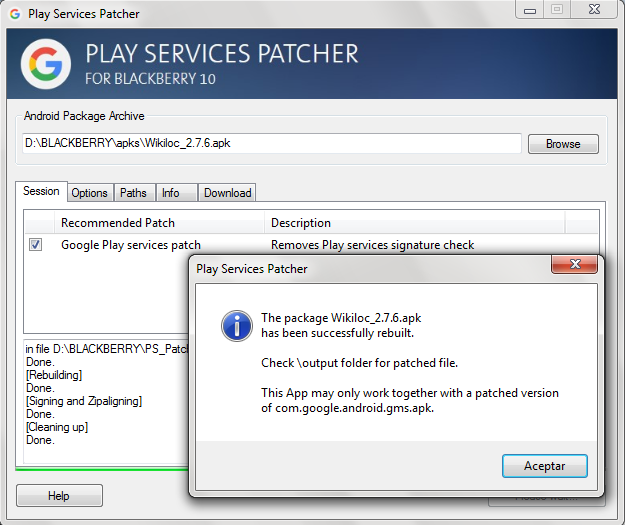
Download and install "Play_services_PS_Patcher-1.4", (it requires JAVA)
Execute, browse, load apk file,
Click on "Analyse APK file" (with default options), Click on "Continue"


Screenshots of patched and working apps


Download fixed/patched apps:

Wikiloc 2.7.8 apk fixed for BB10


(requires GMS service running in the BB10)

By default you cannot the see the maps because default maps are online Google, but an offline map is hundred times in the mountain better for mountain than one requiring a 3G connection.
So from the main menu "Offline maps", download any map (thanks to openstreetmaps community)


Uninstalling Google Services from Blackberry

There are some reason to uninstall these services temporary or definitively, but as it is logic, those patched apps which really require Google services will not work any more ;)


Method1: From Blackberry Google ID, Android Settings, Applications, Google Play services, Uninstall


miércoles, 28 de octubre de 2015

Phone data migration(export/import)

-Contacts from Android to BB10
-Notes from Noteeverything to DejaOffice.
-


Import contacts from Android

Notes for Kies:
-export to csv (only phone contacts):
field contents between quotation marks, and columns delimited by comma
Too many fields(all) are exported in a fixed order, and the first line the field name in your language
groups in 1st field an delimited by double semicolon
i.e "Group1;;Group2;;Group3"

-export to vcf(only phone contacts). 1 per file (will loss groups and extended information)
content of all vcf file can be joined in a vcf file using the msdos copy command

(only phone contacts). There is no reason to extract google account contacts as they are  in the cloud and there are other methods to do it.

BB Contacts Imp/Exp: requires a first line with headers, and it will map to BB contacts
BB Contacts Imp/Exp

-export to csv: field contents between quotation marks, and columns delimited by comma.
Number and position of fields is variable.

To know field names, you can create a dummy contact with enough information and export it to csv

Fields in the header of a csv file  exported by BB Imp/Exp:

"Name/NameGiven","Name/NameMiddle","Name/NameSurname","Phone/Home","Phone/Work","Email/Other","PostalAddressLine1/Home","PostalAddressCity/Home","PostalAddressCountry/Home","PostalAddressLabel/Home","OrganizationAffiliation/OrganizationAffiliationName"

Mapping CSV from Android with "Contacts Imp/Exp" headers from csv file.
Use a good spreadsheet software like Gnumeric or Libreoffice (avoid excel  because it cannot export properly)

Verification after export:
Check that long numbers i.e 420721958625 are not shorten to a form like xxxE+11 (another reason to avoid the use of Ms Excel)
Check numbers that phones beginning with a 0 have it
Check numbers with a country prefix +xx

Steps to convert:

From Kies csv file, remove as many columns as possible, generally normal users don't use more than 10 fields.
Groups: If you have contacts classified by groups, you can associate "Group" column from Android contacts to "OrganizationAffiliation/OrganizationAffiliationName" column in BB
If contacts are associated to multiple groups it, and you want to keep it, it would require more complex steps, before mapping if decide to kept only a group per contact and remove additional.


sábado, 3 de octubre de 2015

Best Software for Blackberry 10 (native and Android)

Natives or based in Android runtime.

Best of native apps/ports:
  Dejaoffice 2.4.5 (ported)
  GhostCommander 1.51
  No Tag Player (folder mp3 player)
  Flashlight Pro
  ContactsIm Ex
  Maxidict (native dictionary, free version only search in a startdict at time)
     (SD in /accounts/1000/removable/sdcard/documents/MaxiDict or any custom folder
     Y:\documents\MaxiDict)
  K9 5 (ported)
  Navfree /Navmii (maps based in OSM free maps) (ported)
  Q Browser (based in the BB browser and therefore a webkit flavour)
  BGshell
  LuckyPatcher 5.4.3(ported)

  Google services (patched by Cobalt)

Whatsapp(BB native, not working anymore)
SD\photos\WhatsApp\2017-xx


Best/Mustto (apk) from Android: (for more Android apps see Best Android apps)
   F-Droid
   Whatsapp(android)
       Media: SD\Android\WhatsApp\Media\WhatsApp Images
palmOS_styletap_android.png
   APK Permission Remover 1.3.3 (heagoo.apkpermremover)
   Palemoon 25.8
   Advanced Task killer 2.0.3 (rechild)
   Note everything
   Apk extractor
   MiniLyrics 1.0.18(from apk)
   KeepassDroid 2.0.3
   Applications info 1.5 (from F-droid)
   Amaze (opensource fileexplorer, app backup to apk) 
   Styletap (PalmOS emulator)
       \misc\android\Android\data\com.StyleTap.StyleTap\import


  fungipedia lite (mushrooms)
       \misc\android\Android\data\com.codewai.fungipedialite\files\galerias

  GPS-MAPS
Applications info (from F-droid)
   Wikiloc 2.7.1 (patched - requires Google Maps services)
     (\misc\android\wikiloc\offlineMaps)

   City Mapper (patched - requires Google Maps services)
   Moovit

   Triposo (download region info from wikitravel  to read offline, maps doesn't work)
   /mnt/sdcard/Android/data/com.triposo.droidguide.world

  Genius Maps (Navteq maps)
    (Format map .cpf, .ie.  spain_nt_2016q1_cell.cpf)
   W:\Arthur
   
  Mireo Dont Panic (tomtom2015)
(Format map .cpf, .ie.  spain_ta_201503_cell.cpf)
   W:\Dontpanic


Configuring BB10/Software:
     
Import contacts from .vcf or .csv file using "ContactsIm Ex"
    (clean android contacts with Kies)

Import DejaOffice db  (from android)
   send or copy backup file from Android /clusb
   to device/misc/android/clusb/
   rename or delete companionlink.db (Dejaoffice must be closed)
   rename backup file (companionlink2015-xx-xx).db to companionlink.db
 

Note everything
  How to install "Note everything" keeping folders/categories (!)
     copy folder /noteeverything/backup from Android to device/misc/android/noteeverything
      install "Note everything" apk, app will detect previous backup in the folder and will ask for a restore

(!)     (Note: addon pro 2.5.1 doesn't work with Blackberry so backup functions cannot be used and expert to textnotes and import losses folder/categories)

    If notes are not classified, following method is OK
       in android "Export textnotes to SD"
      copy folder /noteeverything/text from Android to  device/misc/android/noteeverything
      Import, Mass import from SD-card, choose previous folder

Install Drivers on PC

Connect to PC     
    Access to SD     (to install mass storage drivers)
    Install Drivers    (to install drivers, Link and Blend) go to Computer, cdrom unit (folder .\Drivers)
  
Backup of BB configuration with Blackberry Link


Issues with:
   Wikiloc (as it need google play services, Accept to download them but it fails)
   Goldendict  pro  (as it need google play services, there is a 10 seconds lag) 


   Sygic 14.3.4 (maps 2014.0x)
    by default resources (storage/sdcard0/Sygic)
   From Android, zip the folder "/storage/sdcard0/Sygic"
   Unzip to: /mnt/sdcard/Sygic

     m_strSetMapPath=/../../../extSdCard/Sygic/Maps

   Here save maps to PC
    on Android, rename folder that is removing dot symbol from beggining of filename in order to do visible the hidden folder
   From PC copy the folder
   on Android, rename previous folder adding the  dot symbol at beggining of filename


sábado, 12 de septiembre de 2015

Android: ROMs - Root - Utilities


ROMs
Samsung ROM naming convention

B5330XXAL4 :
B5330(=model)XX(=Region)A(=Year)L(=Month)4(=Revision)
XA Austria, France, Germany, Italy, Netherlands, Switzerland, United Kingdom
XW France, Germany, Italy, Netherlands, Portugal, Spain, Turkey, United Kingdom
XX Austria, Belgium, France, Germany, Hungary, Italy, Spain, United Kingdom

ALI4=Android 4.0.4 ICS (2012/9)
BMC2 =Android 4.1.2 JellyBean (2013/3)
BMD2= Android 4.1.2 JellyBean (2013/4)


YEAR CODES
K 2011
L 2012
M 2013
...

MONTH CODES
A January
C March
E May
G July
I September
K November
L December

REVISION CODES
1 = 1
2 = 2
A = 10
B = 11
C = 12


Root your device


Requirements:
Settings, Developer options
ON
USB debugging(Checked)


App to verify:
root verifier (install from F-droid)

Check XDA developers for information and procedure
http://www.xda-developers.com/root/

Suggested Utilities:

Superuser
F-droid 0.76
OI Explorer 2.03   (Free File explorer, not root)
Ghost commander 1.52.2   (Free Advanced File explorer, apps,...)
All-In-One Toolbox 1.5  (processes, cleaner, app2sd, filemanager)
BusyBox Pro v19
APK extractor (free  - extract apps to apk)

Root verifier (free)(com.abcdjdj.rootverifier)
Root checker (burrows.apps.rootchecker)(with ads, required google services,  good info about system)
Super user (com.noshufou.android.su)
Disk Usage (com.google.android.diskusage)(free)

(Useful but not free as free beer or freedom)
System Tuner Pro  2.1.2 (tasks, root uninstall system apps, terminal, startups,)
Android tuner 0.12.9 (root, uninstall user apps, many tools, root explorer, terminal, firewall,startups,..)
Root Software

ROM Manager 5.5 (free includes ads)
 install ClockworkMod
 ROM download, backup, restore, fix permissions...

lunes, 7 de septiembre de 2015

Blackberry OS 10.x - System + Android runtime


Blackberry OS 10 in Classic device
HW Model: Classic - SQC100-1 (Q20)
HW: MSM8960 v3.2.1.1 N rev.11

Original soft release v.10.3.1.1779
   Soft release updated to  v.10.3.3.2137
                                         v.10.3.2.2474
                                         v.10.3.2.2836 

Original OS10 ver.  v.10.3.1.2576

Updated OS10 ver.  v.10.3.3.3216
                                 v.10.3.2.2639
                                 v.10.3.2.2876 
                          

3.5" 720x720 - 290.6 ppi
CPU: Qualcomm dual-core Snapdragon S4 MSM8960- 1.5 GHz Krait + Adreno 225 (GPU) (32bits core)
(Snapdragon S4/Krait is a ARMv7-A compatible CPU architecture,  armhf=ARMv7 )
RAM: 2GB of LPDDR2 SDRAM -16GB of built-in storage
MicroUSB - HDMI output (Slimport)
Nano-SIM
microSD up to 32GB

Battery 2515mAh 9,56Wh (SMD connector)

Android runtime. ver: 4.3


Unsupported APIs from JellyBean
https://developer.blackberry.com/android/apisupport/unsupportedapi_jellybean.html


Blackberry folders/paths

**Internal mem:**
/mnt/sdcard/ (Android runtime)
/sdcard (alias to /mnt/sdcard/)
/misc/android/
/accounts/1000/shared/misc/android (BB filesystem):

**Android folder  in internal mem**
/mnt/sdcard/Android  (Android runtime)
/misc/android/android (alias to /mnt/sdcard/misc/android/android)
/accounts/1000/shared/misc/android (BB filesystem):

**external/SD card memory:**
/mnt/sdcard/external_sd/  (Android runtime)
/accounts/1000/removable/sdcard/ (BB filesystem):
 Specific examples of folders:

/mnt/sdcard/external_sd/camera (Y:\camera)
/misc/android/    (used by Adobe PDF)
/misc\android\com.fsck.k9 (k9 settings)
\misc\android\MapsWithMe\150805 (MapsWithMe maps)

* All Android apps, even those ported to BB10 save files to this path


Configuring a BB from the very beginning
(avoiding any cloud service)

0- (just if you are cleaning an used phone)

settings;security and privacy, security wipe
1-

Autoconfiguration for provider
Configure wifi, Bluetooth device name

Step create a Blackberry account for Blackberry world  
    Install ContactsIm Ex
      Play cloud (native file manager)
      BG-SSH


Install Google services (optional)


martes, 16 de diciembre de 2014

Android free of Google/samsung limitations (I)

People trusted in Google because they were afraid of  Microsoft and Apple behavior.


Having Linux inside of the Android base seemed to be a good point in order to feel free and  many IT professionals, gurus and some even free software fighters were in the first line of the Android army.


However applications for Android are not Linux compatible apps but a Java flavor apps, thus existing free apps for Linux, Maemo,... will not be easily ported to Android.
Furthermore accessing to the Linux layer and its services requires to root the device thus root your device should be a "todo" but it is not always easy and with no risks :(

Even very recognized organizations such as FSFE suggests to root Android
http://fsfe.org/campaigns/android/android.en.html


It is a pity that other operating system were not promoted, or devices using them bought enough by the community.

An example of these better OS are:
  • Maemo, Meego,Mer  real linux environments and able to run linux compatible code
  • WebOS(from Palm) OS based in linux and apps based on HTML5/Web application

Now, the alternatives to Android/iOS/Windows comes from:
  • Jolla and its SailfishOS,  a phone created by some of the Nokia people, compatible with Linux code and QT SDK. Also able to execute Android apps
  • Firefox OS.
  • Blackberry  and BB10 OS based QNX (linux flavour), also including physical keyboard support. Apps based in C++/QT, HTML5,...and also able to execute Android apps via the included "Android runtime"

After this overview of current mobile phone scene, see below how to fight against the many lacks of Android:

If you are going to buy an Android phone
Buy a device from the following list of phones with a procedure to root
http://www.xda-developers.com/root/

Avoid using Google Play and use F-Droid repository as much as possible
  Settings, Security, (Device Administration), Unknown sources (check)
F-droid  It can be done even with a device not associated to a google account
  https://f-droid.org/   and install apk from the Interner browser.


Reset your device
  If you feel that you don't have the control of your device, maybe you installed many apps from google play with 'abusive licenses' and too many rights
  Settings, Backup and reset, (Personal data), Factory data reset
  
Configure your Android for standalone use (avoid google cloud,etc)

   There are 3rd party software better than that included in Android
      DejaOffice
      Offline GPS/Maps(OSMAnd, Navit, Sygic, Tomtom..)
      K9 Mail 

https://fsfe.org/activities/nocloud/nocloud.en.html

Check and Disable things from Google Settings 
Open "Google Setting" app and check all sections.
from Security, disable "Verify apps" (optional)
from Location, disable "Access location"

   
Disable Location services
 in Settings, Location Services,
   Disable/Uncheck "Location and Google search"  
   There are 3rd party software for GPS and maps such as sygic
   Furthermore you can still using google maps entering your position manually
   and even you can disable it, and enable it only when you need it.

Checks running services/processes
Control what is happening ak paranoiac mode

 from Settings, Application manager, Running, "Show cached processes"
    Google play services(launched by apps)
       Google Analytics services
    Email
    Factory mode (required)
    Google+
    Exchange services (required by SMS)

 from Settings, Application manager, Running, "Show services in use"

Stop apps/processes
Once you know what apps are being executed
from Settings, Application manager, All,

select app and Click "Force Stop"
after a stop several times we can realize if they are important or not, so they can be disabled forever 

Disable built-in apps or remove if you are root
(Google, Phone  brand, communications provider)

from Settings, Application manager, All

-ChatON (Samsung)
-Game Hub (Samsung)
-Gmail (optional)
-Google .... Sync
-Google partner Set up

-Google Play Music and Books
-Google Search
-Google+
-Picasa Uploader
-Samsung Account
-Samsung AppsUNA2
-Samsung Backup Provider

-Samsung ......Sync
-Samsung Cloud data relay
-Samsung Push services
-Samsung Browser
-Software update (if you are not expecting a new update)
-Talk


i.e of Comunication provider apps
My web (com.vodafone.android....)

http://forum.xda-developers.com/showthread.php?t=2242278


Autostarts and permissions

To find problematic apps

execute free app "Autostarts", and check sections:

 "During Startup", "After Startup", " Wi-Fi state changed", "Power connected", "Connectivity changed",..
(to  disable them, root is required)

 execute free app "OS Monitor" to display Android/linux processes, TCP/IP open connections,...

 execute free app "OS Monitor"

To fix/correct problematic apps

on Android. From: AppsOp  (if it is hidden there is an app in f-droid archive to open the menu)
on BB10+Cobalt's play services: From "Blackberry Google ID", "App Permissions"


Check if it has sense that the app has the following rights and last time the app used it ( to detect abuse)

    Read your contacts, Read clipboard, Location, Run at startup....
    Post notification

Remove rights:


Fix/Remove autostarts: Autorun manager (com.gmail.heagoo.autorun.pro)


miércoles, 16 de mayo de 2012

PIM Data conversion -Contacts, Calendar, Tasks, Memos,..

Replace a platform is a hard decision, and too many times implies data loss. After spend sometime looking for methods find below how I moved from Palm OS to Android.


FROM PALMOS TO ANDROID:

**PalmOS**

General info.
PalmDesktop 4.1.4
Export
Contacts: aba, csv, tab (Export all)
excel, Word (select all, send to)
vcf (vcard) (Select all, export to vcf) *

Tasks: tda (Export all)
excel, Word (select all, send to)
Memo: mpa, csv, tab, txt (Export all)
Word (select all, send to)
Calendar: dba

* works in PalmDesktop 6

**Android**
General Info.
Contacts
Import from SIM
Import from SD (vcf file in SD) *
Import from Google
* Classification category is lost

Procedures
Palm contacts to Android contacts
Export from Palm Desktop as .vcf containing all contacts
Copy vcf file in Android SD
Import from SD in Android
Recreate categories in Phone or Kies manager

Palm Memos to Note Everything
Follow Note everything manual or
Export from Palm desktop to csv, import in excel and let the columns as

column1 =category
column2=memo content

Palm desktop to Android DejaOffice
DejaOffice has its own contacts, memos, tasks, so syncronization will not affect to default Android apps.

Requirements in Computer:
-Palm Desktop installed and previously synchronized with Palm Phone
-PC with Android Phone drivers (Install Kies for Samsung, connect phone and drivers will be installed)
-CompanionLink * installed (Checked with v 3.0.3089)


Steps:
1. Configure CompanionLink
1.1 PDA: Android USB
1.2 PIM: Palm desktop (Access)
1.3 Configuration: Palm desktop as primary
2 Connect phone by USB
3 Execute DejaOffice in Android,
3.1 Click "Syncronize" on DejaOffice menus
3.2 Wait
3.2 Disconnect Phone from PC

Now Contacts, task, calendar and memos will be available in Dejaoffice :)


Android Calendar to DejaOffice Calendar
Android calendar is a piece of crap,with poor on features and with a lack of usability in UI.
But if you have data en Calendar and you want to move to DejaCalendar without sync with google web (I don't like the cloud).

go to "Settings", "Sync settings" and activate "Sync with Android Calendar App"

Note. At least in the spanish translated version 2.1.9
"Sync with Android Calendar App"and "Sync with Android Contact App" are incorrectly exchaged.
After select you have to chose between alarms in Android Calendar or DejaCalendar.
Chose categories to sync.

In Home/ main menu chose "Read Android Data"
Now we have real calendar. ;)


Outlook Calendar to DejaOffice Calendar (using Sundbird -> no cloud,  no shit in the middle)

From Outlook Calendar.
  Save Calendar as (as ICS)
  Date range: Specify dates
  Detail: Full detail
  Advanced: Include details of items marked private

From Sunbird (Mozilla Sunbird 1.0b1)
  Import ICS file  and remove instance/occurrences
  Select specific events and export Selection (to ics)

From Android
  Open ICS file from Android (any file explorer)
  DejaOffice will import the entries and even categories will be preserved.