jueves, 11 de julio de 2013

XML- Map data to XML for XOG

XOG-in CSV data to a Clarity custom object

Using Mapforce2013 *
*Mapforce2013Enterprise (rel2sp2) [commercial app]
With installation folder it can be used as a portable app.
Registration is computer dependent (C:\ProgramData\Altova\MapForce2013)


In order to generate a xml to xog-in

  • Add schema file(xsd)
    •   ../xsd/nikuxog_customObjectInstance.xsd
  • Add csv or xslx (xslx better to display column headers)
    •  Config. rows level, "Show separate items for columns"

  • Config at XSD
    •  Attributes content is inside tag ColumnValue
    • Add a duplicate of ColumnValue per each attribute to map
    • map attribute name to "name" element in Schema
    • map content to "text()" element in Schema
  • Map columns and constants to Schema
    •  map Row number to xsd element with iteration (sequence)
    •  map columns to xsd elements


Mapforce mapping
  

  • Menu: Output, Save Output file, (xml file to xog-in)
  • Edit in xml file to correct local paths, i.e.  xsi:noNamespaceSchemaLocation="../../xsd/nikuxog_customObjectInstance.xsd"
Notes
*Clarity date attribute is in format yyyy-mm-ddT00:00:00 and will be xogout including time but format yyyy-mm-dd is supported for xogin

martes, 11 de junio de 2013

Clarity - partition - lookup and mappings

  How to use partitioned values in a static list lookup with attribute mappings

I am writing this short procedure because I think it is quite interesting and I didn't see any document about it. For instance, it can be done with out of the box "Investment Status Indicator"   attribute

Lookup ID:    INVESTMENT_STATUS_INDICATOR
and
Attribute Name: Status Indicator

It is possible to create values associated to partitions from lookup "Values"


However, from object attribute I cannot see the lookupvalues if they are associated to "Mipartition:Partition and descendants"
If we change to "Partition, ancestors and descendants" then we can see them from mappings and map  with colors


with Partition, ancestors and descendants


But now the values are available for non partition views and users. :(
So, We change values to "Mipartition:Partition and descendants"
Now, partitioned values are not available for system views :)
But from partition views, these values are available and can be selected. :)


Note that at the moment from the attribute we can see all the mappings but those two associated to partition values will appear without value associated. It is only a visual effect and in the database they are configured well, in fact if we would reconfig values to "Partition, ancestors and descendants" they automatically will be displayed in mappings list  :)

with Partition and descendants

If you have  an error "HTTP 500 Internal server error"when editing from  Project List whereas same action from a system view works fine. Go to partition views and click Publish (it will restore user view customization).


viernes, 19 de abril de 2013

Clarity XOG - XML - WSDL -SOAP - Content package

XOG compatibility

Usually XOG version are compatible with Clarity version if there is not changes in the database structure. Differences in .xsd files could mean differences between data in Clarity.

Anyway default version association:
Clarity v.12.1 SP1
i.e. XOG 10.50.0.125

Clarity v.13.0.1.0102

Clarity v.13.1.00248
 for example  XOG V12.0.6.5471 could work with a Clarity v.13.0.1, but there is a risk...


Testing XOG from Clarity web
 v12.

……/niku/app?action=xog.client
 v13.
……/niku/nu#action:xog.client


XML Open Gateway (XOG)
web service interface that you can use to:
  *Import data
  *Export data
  *Move configuration data from one system to another
to read data from or write data to CA Clarity using XML and web services
GEL tags that can be used with XML for more advanced custom integration tasks
CA Clarity web services use XML messages that follow the SOAP standard.

WSDL Reference
https://servername.domain.com/niku/wsdl

SOAP Testing - Queries\WSDL

SOAP UI
 SOAP UI, free licence software, after downloading a Clarity  WSDL template, remove or comment all those conditions or filters that you are not using for your request.


SOAP Sonar.
SOAP Sonar
Commercial software and gratis only for a single project/query open. Very easy to work with filter parameters, because  only those parameters introduced in inputboxes will be used for the request.


Working\Saving XML Read Files
ANSI/CP1252, UTF8without BOM
Tags:
Comments:


Common filters:

EQUALS
OR
BEFORE
AFTER
BETWEEN

i.e
x,y

Custom Objects
Reading Object definition
custom_object_instances_read.xml

Reading contents/instances
custom_object_read.xml


Stock objects
Read reference.

Sort results

or when more there is more tahn one element


Arguments:


XOG-out /XOG-in

Between different environments (i.e Project)

  1. XOGout a project
  2. Edit XML to adapt to new enviroment 
    1. Replace Projectid by an id not in use, if attribute is autonumeric, use the next id
  3. Remove all unique tags in a Clarity instance (i.e internalTaskID)
    1. from notepad: find internalTaskID=".*?"
    2. Select "Regular expression"
    3. checkbox ".matches newline"
    4. Count (verify)
    5. Replace  (with nothing)
  4. (Some unique tags like taskID are unique  but the ambit is just the project  )
  5. Check 
    1. resources, if userid is autonumeric could be different between the environments
  6. XOG-in to new environment
Between different environments (i.e User/resources)
  1. XOGOut resources (rsm_resources)
    1. filter by resourceID supports wildcard %
  2. XOGOut Users/accounts (cmn_users)   
    1. filter by userName doesn't supports wildcards, so use criteria="OR" and values separated by comma (without spaces)      
    2. Password not extracted, default password=Niku2000
  3. Edit XML files
  4. --Users: add properties for delete to XML tags
    1. Note: complete and completed/Iscomplete are synonyms      
    2. i.e. complete="true" for (capscase, don't use Uppercase)
    3. supported by: OBSAssocs, Groups, GlobalRights, InstanceRights, InstanceOBSRights, SkillAssocs
    4. i.e. ReplaceAll "Groups" by "Groups complete="true""
  5. --Resources
    1. complete="true" for (optional)
    2. resetCalendar="true" to
    3. (*)additional fields cannot  be reset from XOG such as Booking Manager,Date of Termination, Allocations,....
  6.     XOGIn     
    1. Reset by hand all those attributes which could not be reset by XOG
  Content packages/Export
  •  Add process (must be Active)

 Import/Install Add-in/Upload Content Package 
  • Install in Migration Mode. This option forces all content items in the package to install and overwrite old existing content. 
  • A package with same version cannot be uploaded twice
  • Add-in packages cannot be deleted

jueves, 11 de abril de 2013

Databases, csv, spreadsheets and other herbs


Data export and import between databases and spreadsheets should be an easy task, but sometimes progress in time doesn't mean advance of products or functionalities, at least it is true fact when we are speaking about Microsoft products.


For instance, a task like specify a separator symbol in Excel; different than comma was so easy in the past, but now it is nightmare.


Dbvisualizer - find drivers
Database extraction

For example SQLTools or DB visualizer

-SQLTools, fast and free tool, can work without installation but requires Oracle client installed.

Config of connections:
.\GNU\SQLTools\connections.xml
or
.\SQLTools\SharedData\connections.xml

-DB visualizer supports many database drivers (even can be detected from the computer)
Support extraction to CSV files, and select a separator symbol.

Remove Newline Character. Always checked, to avoid return carriage ia a field being used as delimiter

C:\Users\myuser\.dbvis\config70\dbvis.xml

Notes: There is an issue with  DBvisualizer/Gnumeric, default windows enconding "cp1252" from DBvis cannot be recognized by Gnumeric.
Oracle SQL Developer - Export


Squirrel SQL

C:\Users\myuser\.squirrel-sql\SQLAliases23.xml

SQL Developer (Oracle)
With many options and able to work with many connections and tables at same time.
Can export to csv, tsv, dsv, xls,xlsx (including query in a different tab)

v 4.1.3.20
Features:
CVS integrated with compare features (tab: Historial)
Result of previous queries  (results tabs)

Settings/configuration:
Herramientas,Preferencias,Editor de codigos, Canal de Linea, Mostrar números de líneas
Herramientas,Preferencias,Base de datos,NLS, formato fecha=DD/MM/RR HH24:MI:SSXFF
Herramientas,Preferencias,Base de datos,Avanzada, Tamaño de recuperación.. =50


Connections configuration:

Users\myself\AppData\Roaming\SQL Developer\system4.1.3xx\o.jdeveloper.db.connection.12.2.1.0xx\connections.xml (includes encrypted password, file with passwords will work on other system/version)


Connections, Export/import connections  (requires a password to encrypt passwords in xml file)

Install Password Plugin: Show me password
com.tomecode.showme.password.sqldeveloper.1.0.0


JDK configuration


by default ../../jdk
(if not detected there; a browse folder box will allow us to select the folder)


sqldeveloper4.x.\sqldeveloper\sqldeveloper\bin\sqldeveloper.conf

SetJavaHome ../../jdk


Spreadsheets

Gnumeric:
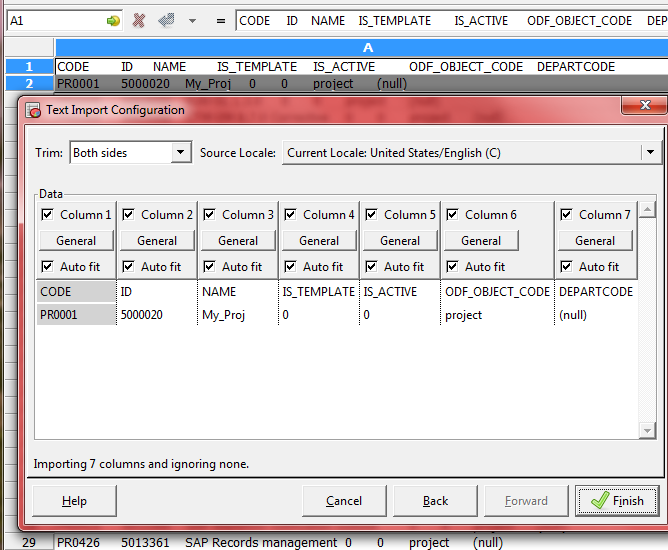
is able to import csv files with a different than comma symbol,
is able to export a spreadsheet with an specific separator

There are problems importing a  csv file DBvis enconded with "cp1252"
The following combinatiosn works

DBvisualizer / Gnumeric
UTF8        /    ISO 8859-2
CP1252    /    Windows 1250

Import
Go to "Data", "Import Text File", "Text import configuration" or "Data", "Text to Columns"


Export
Save As, File type: Text (configurable)
Gnumeric Export


Ms. Excel 2003
Can import csv, and even specify delimiters but it is useless for exportation to csv as it always delimit columns using semicolon.
Theorically from Computer, regional settings, delimiter can be configured but it doesn´t work.

Ms. Excel (>2007)

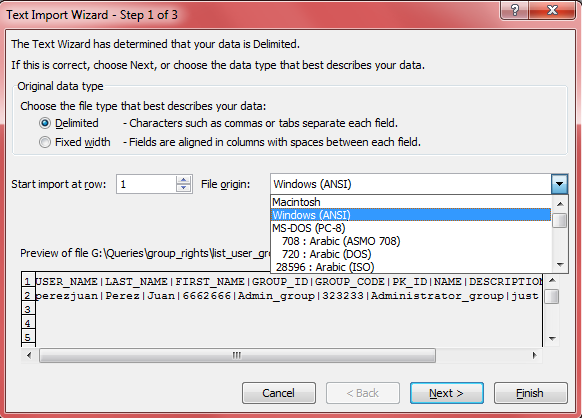
Last versions removed the option Import in Menu, so now it is not very intuitive, but it can be done opening a text file with a .txt extension (don't use csv, because automatically comma will be used as delimiter)  and a wizards will be launched.
Theoretically from Computer, regional settings, delimiter can be configured but it doesn't work with Windows 7.  Probably excel is one of the best Microsoft apps but there is a complete lack of interoperability. Better to use Libreoffice

Excel import


Formating contents in Excel:

Cleaning acents:
Limited by maximun of nested functions:
=SUBSTITUTE(SUBSTITUTE(SUBSTITUTE(SUBSTITUTE(SUBSTITUTE(SUBSTITUTE(B1,"á","a"),"é","e"),"í","i"),"ó","o"),"ú","u"),"ã","a")

Convert to Proper name and clean acents
=SUBSTITUTE(SUBSTITUTE(SUBSTITUTE(SUBSTITUTE(SUBSTITUTE(PROPER(A9),"á","a"),"é","e"),"í","i"),"ó","o"),"ú","u")


Look for a string in an array a extract a column from same row
=VLOOKUP(b2,!equivalencias$1:$20,2,FALSE)
=VLOOKUP(stringtofind,in_array!$first_row:$last_row,col_to extract,FALSE)
False=match exact string

Find a string in the last characters
=IF(RIGHT(E2,10)="@domain.es","Spanish",IF(RIGHT(E2,13)="@domain.co.uk","British","none"))

Detect white spaces at beginning or end of a string
i.e if space found write the string without spaces.
=IF(OR(LEFT(A2,1)=" ",RIGHT(A2,1)=" "),TRIM(A2),"Word  is OK")


Libreoffice/OpenOffice

Import, just open a csv file and wizard automatically will open.

Export, Save as: CSV with checkbox "Edit filter settings" let us to change delimiter character or add quotation marks to fields

miércoles, 23 de enero de 2013

Clarity Development III (Queries, NSQL)


--- Queries  in Clarity---


NSQL
SELECT field
FROM table *

-How to find the names to use from Clarity.

Table=Table name. Check in Object, Attributes, "Database Table" column
* i.e for custom objects: odf_ca_cop_xxxxxx

Field=Attribute name.
For custom attributes, check in Object, Attributes, "Database Column" column
For default attributes, click on "Attribute" column, and use  "Attribute ID" (in Object Attribute window)
For virtual attributes, check in Object, Attributes, "Database Column" column

-NSQL Query in a Lookup-Query:
Lookup-query supports works with a quite standar SQL syntaxis

i.e
SELECT   @SELECT:my.code:code@,       
         @SELECT:P.PROJECT_CODE:PROJECT_CODE@,       
FROM   odf_ca_myobject my, PAC_MNT_PROJECTS P
WHERE @FILTER@


-NSQL query in QUERY 

Requires the comple NQL syntaxis and at least one dimension definition (SELECT:DIM:)

i.e.
SELECT   @SELECT:DIM:USER_DEF:IMPLIED:Mytest:my.code:code@,       
         @SELECT:DIM_PROP:USER_DEF:IMPLIED:Mytest:my.created_by:created_by@
FROM   odf_ca_myobject my
WHERE  @FILTER@

-Table Prefixes


PrefixTable Topic
BIZ,Opportunities
CAL,Events
CAP,Capacity Planning
CLB,Collaboration
CMN,Common tables that span functionality
CMN_RPT,Reporting
CMN_SEC,Security
MR,Methodology
NBI,Datamart
NTD,Discussions
OBS,Organizational Breakdown Structure
PAC,Project Accounting
PPA,Project Billing
PR and PRJ,Projects
RSM,Resource management
SRM,Main objects table that crosses functionality modules
TAX,Tax
XDM,eXtensible Data Model (XDM) for user-defined fields and forms

(added tables)
COP, from PMO Accelerator (not tied to any specific industry)
CATS,  from Best Practises Accelerator (old) (BPA)
ODF,
ODMD, CA Clarity PPM Essentials
PR2, Accelerator PRINCE2 (tied to PRINCE2 from Office of Government Commerce)
PBK, Accelerator PMBOK guide (tied to PMI PMBOK)
CSK, Accelerator Program Management Office (PMO)

TIPS for Naming in Clarity (objects, attributes,...)
qry query
q_ query
lkp lookup
l_ lookup
prt portlet
rpt report
prj project
proc process
res resource
tab tab
obj object
o_ object
pfl portafolio

martes, 15 de enero de 2013

Clarity development II (power filter, calculated attributes, Processes..)

Calculated attributes & Power Filters  & Process conditions

Calculated attributes

result type: string
   
Concat(string1,string2,...)   

Concat(attribute)

If a lookup attribute (ie. project.goal_code) are not listed in the pulldown try to write id  in formula ;)


DateDiff(start,finish,"Day")

Be careful with syntax because some functions like DateDiff,  internally the result can be negative but the attribute will displays with no minus symbol.!!
!!(If negative it will be displayed in red color and between bracket () symbols)


Boolean output Min(Max(DateDiff(Now(), prfinish,"Day"),0),1)


Calculated attribute+mappi>ng colors 
DateDiff(Now(), prfinish,"Day")
-1 to -100 (red)
0 to 100 (green)
In views, Fields, configure field; Display Elements=Image  


Power Filters
-Power filters are not SQL!
-The Power Filter is currently designed to search for values only. If you leave the field empty (NULL value) that field is not included in the filtering. There is no current functionality that allows the configuration of the power filter to search for NULL or NOT NULL values.

"wildcard" character in Oracle is a percentage "%", but Clarity handles that;
i.e. I enter a "*" in a Clarity LIKE condition and this is converted by Clarity to a "%" when the SQL hits the database.

note: on v7.5.3 on Oracle, both % and * worked as wildcards, since v8 only * has worked

Examples:
project.schedule_finish >= dateMacro("today")+50
like( project.name, "Mi_" ) && notLike( project.name, "PR-" )


Syntax: dateMacro(“period name”)
previousDay
currentDay
nextDay
today
previousWeek
currentWeek
nextWeek
previousMonth
currentMonth
nextMonth
previousQuarter
currentQuarter
nextQuarter
previousYear
currentYear
nextYear


Process Conditions 

Start conditions. to avoid to enter in the process. Include here the conditions required by steps.
To detect a change in on attribute: I.e of formula created by manual writing or generated from forms.
( project.status__oldValue != lookup("INVESTMENT_OBJ_STATUS", 1) && project.status == lookup("INVESTMENT_OBJ_STATUS", 1) ) || ( project.status__oldValue == lookup("INVESTMENT_OBJ_STATUS", 1) && project.status != lookup("INVESTMENT_OBJ_STATUS", 1) )
Same expression (Clarity Evaluated)
( ( ( Project Status [Previous Value] != 'Approved' ) and ( Project Status = 'Approved' ) ) or ( ( Project Status [Previous Value] = 'Approved' ) and ( Project Status != 'Approved' ) ))
Process Notification
Process have default message for notifications, and these messsages can be customized per each process.

Some generic tags:

[processName]
[stepName]
[stepActionName]
[objectName]: [objectInstanceName]

when using "project" object
$[Projects.unique_code]
$[Projects.manager_id]
@[:projmgr.projectDefaultTab!~:~:Click Here]

martes, 16 de octubre de 2012

CA Clarity development I (concepts)


Concepts and differences:

Portlets


Provide information in real time for CA Clarity PPM users, most suitable when your query data contains only one or two dimensions(metrics); from different objects

-Grid portlet. based in data from a dataprovider such as Object, System, Clarity Query (NSQL).  

Real only when dataprovider is a Clarity Query (NSQL).

If your grid contains virtual columns, the source data for those columns must be defined in the query that supplies data to the grid.


 --A hierarchical grid portlet can be used to show the structure of data that has more than one level. A parent row can have multiple child rows, and the data that shows in the parent row can be an aggregate of the child data.


Lookups


Static List
Dynamic Query. NSQL is supported in Query.


Hidden key * : Lookup Code /Lookup Enum (type to use in database)
* Important to decide which type use before Save.

After choose hiddenkey
ID (enter once+unique): *
* will assigned to previously chosen field in hiddenkey

LOOKUP_CODE is character type on the database,(if chose "enum", it will contains same number)
LOOK_ENUM is numeric type on the database, use when values are numbers,(if chosen "code", it will contains 0)


"Object" not required for a Dynamic query
Parent Window tab
"Hidden Key" is associated to the field in the first SELECT sentence, (value will be stored in the destination attribute and database)
"Display Attribute":(Output field) will display the content of this field in the attribute, after lookup selection.


Notes:
Lookup configuration is reset. After changes in Query, configuration for Display Attribute and Browse window has to be reconfigured. (Avoid surprises with config documentation)

Attribute Lookup(string)  and Hidden Key. Hidden key will pass the complete result to attribute but it is limited to 30chars, so a bigger string will give error "Error:Value is too large" (verified in v13.1)

Attribute "Data Type" takes its value when it is associated to a lookup for first time, so it will take the type of lookup output (Parent Window )

Be careful!!! because if you change the lookup output field and it has a different type then the attribute will display an error on the web. Furthermore the "Data type" of a lookup attribute is read only the first association to a lookup, so you need to create a new attribute with the correct "Data type".

How to pass parameters to the query:

  • from attribute mapping


Put  @WHERE:PARAM:USER_DEF:INTEGER:xxxx@ in the WHERE clause
Create an attribute and associate with previous lookup, press Save
Now, attribute showsin the bottom the section "Lookup Parameter Mappings"
Select an attribute to map to parameter; from the list of attributes available for this object.


*INTEGER or any other Data type.

  • from the web address (Xpath)
@where:param:xml:integer:/data/xxxx/@value@

xxxx=field in the address such as id, projectid, object_id, etc...
value=returns the value after symbol "="

i.e /niku/nu#action:projmgr.projectProperties&id=1234567&classCode=project
@where:param:xml:integer:/data/id/@value@
returns 1234567


Note: be careful with this pameters because the query could not work as expected with other views containg the lookup, since views can have different fields in the web address.


NSQL. 


-Comments:
-- line comment
/* */  multiline comment
Must be after the first SQL Sentence, ie
 SELECT   
 -- ver. 1.2 Diciembre2012
  @SELECT:resources.id:prid@,


-Read only queries
-UPDATE, INSERT, and DELETE operations cannot be performed in NSQL.
-not recommend using NSQL for reporting or for stored procedures
- Data types: STRING, INTEGER, FLOAT, IMPLIED, FLOAT,DATE, MONEY (in SELECT)

-Dimension Properties Column
@SELECT:DIM:USER_DEF:IMPLIED:::
:
:

New lookup
In "Source" select "Dynamic Query", Submit/Save
In "Query" tab, "Query" text box, enter NSQL query, Save
In "Browse Window" click on the "Preview" button
(a window popup with the query results will be showed).


CA Clarity technical Administration

CA Clarity Administration stuff


Common network ports: 
Clarity app
http 80, 1024, ..
https 8043

Reporting(BO) 
http 8080

Clarity NSA
http 8090
https 8093

Configuration from NSA
BO config: Servers, Properties, reporting
DB config: Servers, Properties, Database
Java app config: Servers, Properties, Application
Logs: Servers, Logs


Version Upgrade
Check  "Data Model Changes" in "CAClarityPPM_ChangeImpactandUpgrade_Guide_ENU.pdf" file in order to be aware of changes in tables.


Queries and  Oracle databases
SQLTools
DBVisualizer

XOG compatibility

Clarity v.12.1 SP1
i.e. XOG 10.50.0.125
Clarity v.13
i.e. XOG 14.0.0.162

Testing XOG from Clarity web
 v12.

……/niku/app?action=xog.client
 v13.
……/niku/nu#action:xog.client

Server info
 ../niku/monitor.jsp
i.e info:

DB_LOGIN=1 LOGIN_SUCCESS=1 LOGIN_TIME_MS=19 NJS_HEARTBEAT_S=52 PE_HEARTBEAT_S=289 LAST_TIMESLICE_S=24 IS_TS_ROLLOVER_DATE=0

../niku/BOServerStatus.jsp

Info about Servers Status, General metrics, Queue metrics

Flush Caches
Flushing caches

v13
../niku/nu#action:security.caches
v12
../niku/nu?action=security.caches


System Locks

v13
../niku/nu#action:security.locks
v12
../niku/app?action=security.locks


 See Server Security Logs
.../niku/nu#action:security.logs

Log filenames and messages:


 bg-ca.log 

Contains info about errors in scheduled reports and Jobs


i.e
....
ERROR 2013-05-24 18:30:03,137 [Dispatch pool-4-thread-2 : bg@serverappxxx.domain.com (tenant=clarity)] niku.njs (clarity:username:9333263__C1AA4D20-121B-43DE-B006-74E7A3366435:schedule_job_Autoschedule Project) Error executing job: 5041627
com.niku.union.utility.MessageKeyException: PRJ-SE04: Could not execute autoschedule job (5041647): Unparseable date: "21/05/2013"
    at com.niku.projmgr.autoschedule.jobs.AutoschedulerJob.scheduledEventFired(AutoschedulerJob.java:91)
    at com.niku.njs.Dispatcher$BGTask.run(Dispatcher.java:292)
    at java.util.concurrent.ThreadPoolExecutor.runWorker(ThreadPoolExecutor.java:1145)
    at java.util.concurrent.ThreadPoolExecutor$Worker.run(ThreadPoolExecutor.java:615)
    at java.lang.Thread.run(Thread.java:722)
   

nsa-system.log
...
Wrapper Started as Daemon
Clarity 13.1.0.0248 initializing...
GMS: address=appservernamexxx-xxxxx, cluster=CLRTY-SA, physical address=x.x.x.x:ppppp
Clarity 13.1.0.0248 ready.
INFO: Server startup in 52214 ms
TERM trapped.  Shutting down.
Wrapper Stopped
....
nsa-ca.log
niku.union (none:none:none:none) Clarity 13.1.0.0248 initializing...
..
niku.union (none:none:none:none) Initializing: tower...
niku.union (none:none:none:none) Initializing: monitor...
niku.union (none:none:none:none) Initializing: nsa...
niku.union (none:none:none:none) Initializing: wmd-init...
niku.union (none:none:none:none) Clarity 13.1.0.0248 ready.
...
config.TenantConfigurationManager (none:none:none:none) Properties/Database: id: clarity
...
niku.union (none:none:none:none) Destroying: tower...

admin.log
 ...
[echo] CA Clarity Accelerator: Program Management Office installation was successful and is complete.
[echo] Check the install.log for errors that might not have been handled.
[echo] Package Installation Successful - 08-April-2013 21:00:01
...
[exec] Content Pack csp version 13.0.1.0102 has been deployed
[exec] DBTools Log - Mon Apr 08 22:28:02 CEST 2013
[echo] Clarity Solution Pack installation was successful and is complete.
[echo] Check the install.log for errors that might not have been handled.
...
(admin)     Following object(s) are invalid:

app-ca.log (application errors)
...
ERROR yyyy-mm-dd hh:mm:ss,mmm [http-bio-14001-exec-xxx] grid.EditListRowServiceImpl (clarity:username:sesionid:GetListContextByRow) Fatal error getting row metadata for project [projectid]
ERROR yyyy-mm-dd hh:mm:ss,mmm [http-bio-14001-exec-xxx] out.service (clarity:username:sesionid:GetListContextByRow) A RuntimeException encountered in Service. Converting to OSFApplicationException.
java.lang.RuntimeException: org.json.JSONException: JSONObject["column"] not found.

WARN  yyyy-mm-dd hh:mm:ss,mmm [http-bio-14001-exec-xxx] web.WebSession (clarity:username:xxxxxxxx__SESSION_ID:odf.filter) A request has been denied as a potential CSRF attack. Request Information-
USER_ID=xxxxxxx
SESSION_ID=xxxxxxxxx
CLIENT_IP_ADDRESS=x.x.x.x
XFF_ADDRESSES=null

app-access-yyyy-mm-dd.log
(from Apache Tomcat)

serverip|[dd/mm/yyyy:hh:mm:ss +0200]|GET /address/file HTTP/1.1|aaa|bbb|cc|token

session id token: i.e. userdid__xxxxaxxe:xxxbaexxxax:-xxxxxxxxxxxxxxxxx
Userid is before the double underscore (__).
Finally, you can locate that user by selecting into the cmn_sessions table.


IP address of requestor
DateTime of the completed request
URL request
HTTP Status Code
Bytes sent back to the client (excluding the header)
Elapsed time of the request (in ms, can be subtracted from the DateTime to get the request startTime)
Clarity sessionId cookie (a distinct way to group requests, can be tied back to the sessions tables in Clarity to find the user)

- no results return to client for this field
aaa=code that the server sends back to the client
2xx= Successful
200= OK
3xx= Redirection
4xx= Error caused by the client
5xx= Error caused by the server

bbb= size of the object returned to the client, not including the response headers.
cc= elapsed time of the request

x.x.x.x|[dd/MM/yyyy:hh:mm:ss +0200]|GET /niku/ui/uitk/gwt/com.ca.clarity.Gantt/Dxxxxxxxxxxxxxxxxxxxx.cache.html HTTP/1.1|200|325759|1803|-
x.x.x.x|[dd/MM/yyyy:hh:mm:ss +0200]|GET /niku/wsdl HTTP/1.0|200|321|1|-

Debug Mode

v12.
https://servername.com/niku/app?action=xxxxxxxxxx&debug=1
XML output


XML Open Gateway (XOG)
web service interface that you can use to:
  *Import data
  *Export data
  *Move configuration data from one system to another
to read data from or write data to CA Clarity using XML and web services
GEL tags that can be used with XML for more advanced custom integration tasks
CA Clarity web services use XML messages that follow the SOAP standard.


jueves, 4 de octubre de 2012

CA Clarity / Openworkbench / Ms Project

Clarity and Opera
Browser compatibility

***Clarity PPM12/13
Web working on Firefox3/10/Opera


Firefox and Clarity
Firefox Toolbox for Clarity     

Firefox portable 3.6.28
+Addons (specific versions for FF3)
chickenfoot107.xpi
colorfultabs-4.6.5-fx+sm.xpi
web_developer-1.2.2-fx+sm.xpi
tabrenamizer-0.9.6-fx.xpi   (*)


tabrenamizer: rules for tab names

(*) Note: web addresses change between Clarity v12 and 13.
It is a pity that "tabrenamizer" doesn't support wildcards  :(


Chickenfoot Scripting for Clarity


Use CF foot methods and Javascript to automate tasks


Web differences between v12/v13
First line v12, second line v13

Web addresses
../niku/app?action=projmgr   (v12)
../niku/nu#action:projmgr (v13)
Elements
 button= "Class"="sectionBarBtn"
 button= "Class" ="ppm_button"


Default script folder:
C:\Users\username\AppData\Roaming\Mozilla\Firefox\Profiles\104679cl.default\chickenfoot
FirefoxPortableLegacy36\Data\profile\chickenfoot


--------------
Project Professional 2010 v14.0.6+CA Clarity PPM Microsoft Project interface

C:\Users\myuser\AppData\Local\Temp
~DF32E99829250D82AE.TMP

files related to Clarity/MSproject

When project is Saved to Clarity the mpp file is uploaded and stored in Clarity server
(PRDOCUMENT table  as BLOB information)

 Plugin for Ms Project files and folders

C:\Program Files (x86)\CA\Clarity\CA Clarity PPM MSPInterface
C:\Program Files (x86)\CA\Clarity\CA Clarity PPM Schedule Connect
file .VSTO
(Visual Studio Tools for Office) Visual Studio add-in (project templates)

MSPAdd2K.mpp
C:\Program Files (x86)\CA\Clarity\CA Clarity PPM MSPInterface\data

to know which  version of Schedule connect is installed:
 java -cp "C:\Program Files (x86)\CA\Clarity\CA Clarity PPM Schedule Connect\lib\version.jar" com.niku.tools.VersionNumber

i.e output : Niku 13.0.1 Build 0102
                  Niku 12.1.2 Build 1260


HKEY_CURRENT_USER\Software\Niku\Schedulers\MPPLookup
info about last open projects and local path with mpp file

HKEY_CURRENT_USER\Software\Niku\Schedulers
database connection data (host, login, port...


-------
Openworkbench Advanced

***Openworkbench 1.1.6
Requires Java version 1.5 or later

***Openworkbench 2.0
Requires Java 1.7?
-------------


 SCHEDLINK

This software is an  interface between web browser and OpenWorkbench, so if our web browser cannot open project in OWB, you have to associate  MIME type to SCHEDLINK. 


SchedLink.exe" sched.nikusl  (by default Silent mode)
SchedLink.exe" /s /d  (setup with output)

Old path
"C:\Program Files\Clarity\Schedule Connect\bin\SchedLink.exe" sched.nikusl /d

New path
"C:\Program Files (x86)\CA\Clarity\CA Clarity PPM Schedule Connect\bin\SchedLink.exe" sched.nikusl /d

/s (setup in silent mode)
it just associate  NIKUSL object to Schedlink (Internet  Explorer)
(Registry: HKCR\MIME\Database\Content Type\application/nikuscheduler\Extension=.nikusl)

/d show output log to c:\SchedLink.log


 Openworkbench/MSP conection file (sched.nikusl)


A project is associated to a specific Scheduler by attribute "Scheduler Format"(Eng) or "Formato del programador" (Spa) (ID: prformat)


Available from UI, Schedule, Tracking


Depending of scheduler associated to a project, downloaded sched/sched.nikusl file will have one of following values:

sched = npWorkbench
sched = msp


Example of MSP (sched.nikusl) received from Clarity.
file = Projname
repo = NIKU
app = null
session = 7594029__D65BAB9D-5B2D-48DC-B282-9CC65AE806D5
projectId = 6037252
driver = HTTP
url = https://myserver.myclarity.es/niku
sslLoginURL = null
sslHandling = SSL_FULL
userName = username
readWrite = false
sched = msp

Example of OWB file received from Clarity.

file = conection_test
repo = NIKU
app = null
session = 35022901__-b554f40:124971fe3a2:-78d61258623780532
projectId = 5203045
driver = HTTP
url = http://my.clarityserver.company.com:8080/niku
sslLoginURL = null
sslHandling = SSL_NONE
userName = username
readWrite = true
sched = npWorkbench